Skip to content
Maintankadin

New Hardware Woes

Fivelives
Wed Feb 08, 2012 8:33 pm

New Hardware Woes

So I got the new hardware in, got it all assembled, and here's the problem:

It won't boot. It won't even bring up the BIOS screen - it starts to spin up the fans, then just cuts out and starts the cycle again a few seconds later.

So far, we've tried plugging in the old PSU to check if that was the issue - it isn't.
We've tried unplugging the video card, no help there, either.

There's a soft click when it shuts off, sounds like a problem in the power supply, but it's not likely to have two power supplies fail in the same exact way - especially when one of them is known to work.

I'm at a loss as to what to try next as far as troubleshooting goes - any advice?
Talaii
Wed Feb 08, 2012 8:47 pm

Re: New Hardware Woes

Have you grounded the motherboard against something? That behaviour is usually something triggering Over-current protection in the power supply, meaning it's drawing too much power. Might mean a short somewhere (unplug everything optional, try taking the motherboard out and testing it outside the case); might mean that one of your components is shorted out internally. I had a friend with the same problem who had bolted the motherboard directly to the backplate, without using standoffs.
Fivelives
Wed Feb 08, 2012 9:10 pm

Re: New Hardware Woes

The motherboard is bolted to the standoffs, and we've tried resetting CMOS by switching the jumper over a few times. Also tried unplugging all of the fans (that's pretty much all that's optional other than the optical drive) and it's still not going.

It's having the same problem even with the video card unplugged from the power supply. There's no onboard video on this motherboard, so we can't try it with the video card completely removed.

Edit to add: I know this is like calling a mechanic and saying "my car won't start", and there's about 5 billion things that it COULD be - and I really appreciate any help you guys can give me.
tullock
Thu Feb 09, 2012 2:59 am

Re: New Hardware Woes

ive seen that behavior from something being shorted out, and also from a processor that doesnt have the heatsink applied properly, as in, its not really making contact with the cpu at all. First thing i would do is pull the motherboard out of the case and set it on the box it came in. Put in the video card and 1 stick of ram, hook up the power supply and try to boot (if the motherboard doesnt have power and reset buttons built in, just short the two pins you hook the power switch to, i use a flathead screwdriver for this usually). If it still cycles power and shuts off without any kind of a post, pull off the heatsink and remount it. Though for it to be the heatsink you would have had to really mess up the install, like one of the pins not locked in or something.
laterna
Thu Feb 09, 2012 4:41 am

Re: New Hardware Woes

I've had a similar issue with a build once, PC would turn on, fans would spin, then shutdown. At the time, it was a PSU problem.
Skye1013
Thu Feb 09, 2012 5:47 am

Re: New Hardware Woes

laterna wrote:I've had a similar issue with a build once, PC would turn on, fans would spin, then shutdown. At the time, it was a PSU problem.

Same. Replaced the PSU and everything worked fine. Is your old PSU a high enough wattage for your new setup (also factoring in degradation over time, depending how old it is)? Could be the new one was DoA.
Fivelives
Thu Feb 09, 2012 12:48 pm

Re: New Hardware Woes

I swapped in the PSU that I was using to run the old setup to check if it was the PSU that was DOA - same issue with that one. It also won't boot without the video card plugged in to the power supply, so we're not thinking it's an undervoltage problem.

I'll try swapping out the heat sink with the one that came with the new CPU and see if that fixes it.
Shyrtandros
Thu Feb 09, 2012 1:09 pm

Re: New Hardware Woes

Fivelives wrote:I swapped in the PSU that I was using to run the old setup to check if it was the PSU that was DOA - same issue with that one. It also won't boot without the video card plugged in to the power supply, so we're not thinking it's an undervoltage problem.

I'll try swapping out the heat sink with the one that came with the new CPU and see if that fixes it.


Where you using one of those grounding wrist bands or were you grounded when you assembled it?

I've never experienced a problem with tinkering w/o a band but I've heard horror stories of how the required static to burn a component is much lower than the required power to make a visible spark or sound.

Good luck. :|
fuzzygeek
Thu Feb 09, 2012 2:37 pm

Re: New Hardware Woes

I've seen this happen when RAM wasn't seated properly, too.

Also, I'd be very disappointed if Fivelives wasn't building his system in the nude, the way real geeks do.
Fivelives
Thu Feb 09, 2012 3:09 pm

Re: New Hardware Woes

I don't use the wrist straps, but I do discharge any buildup on the power supply, then keep myself grounded to the case.

I don't build systems in the nude, sorry fuzzygeek.

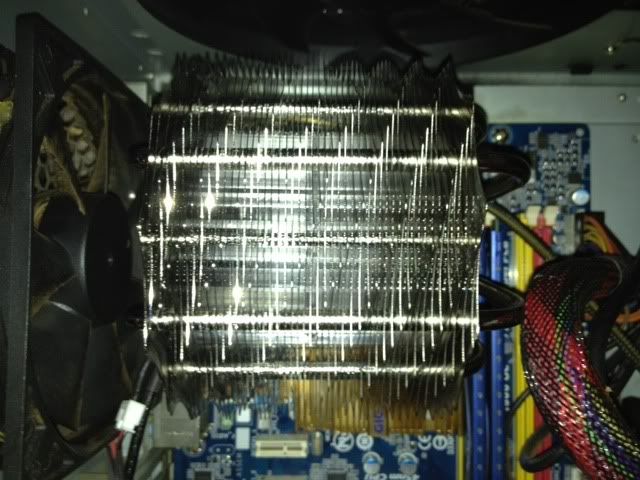
Reseated the RAM, no change - I'll have to wait until my buddy gets off work to have him handle the heat sink swap. I can't reach around it to release the pins holding it to the mobo without shredding my hands to ribbons on the fins, but his fingers are longer and much skinnier than mine.

For reference, this is my heat sink:
Image
Fivelives
Thu Feb 09, 2012 6:10 pm

Re: New Hardware Woes

I'm RMAing the motherboard. I didn't inspect the socket before putting things together and there are a couple of bent pins (6 of them). They're bent 180 degrees down and behind the pins next to them - so we're pretty sure there's no possible way that could have happened during installation.

First time I've ever had an issue with a Gigabyte motherboard.

Edit to add: I'm very impressed with Newegg's customer service. All I had to do was call them up - they're overnighting the replacement at no charge, as long as I return the broken board within 30 days.